LG washer repair Tucson technicians see the FE and IE error codes more than almost any other LG laundry fault, and while the two codes look similar they mean opposite things, which is why understanding them matters before you call for A Plus Appliance Repair. If your LG front-load washer is showing an FE or IE error code, the machine is telling you it has a water problem, either too little coming in or too much. The good news is that several causes are simple checks you can do yourself, especially the IE code, and only some point to a part that needs a technician. This guide explains what each code means, how to work through the causes, and when to call for professional LG washer repair Tucson service at 520-485-5885.
What the IE and FE Codes Actually Mean
The two codes are easy to mix up, so start here. The IE code is an inlet or water supply error. It means the washer did not fill with enough water within the expected time, so the machine is not getting the water it needs. The FE code is an overfill or overflow error. It means the washer detected too much water in the drum, so it stops and often drains to protect your home from a flood. In short, IE means not enough water in, and FE means too much water in. Knowing which one you are seeing points you straight to the right set of causes.
Troubleshooting the IE (Water Inlet) Error
The IE error is the more common of the two and often has a simple fix. Work through these in order.
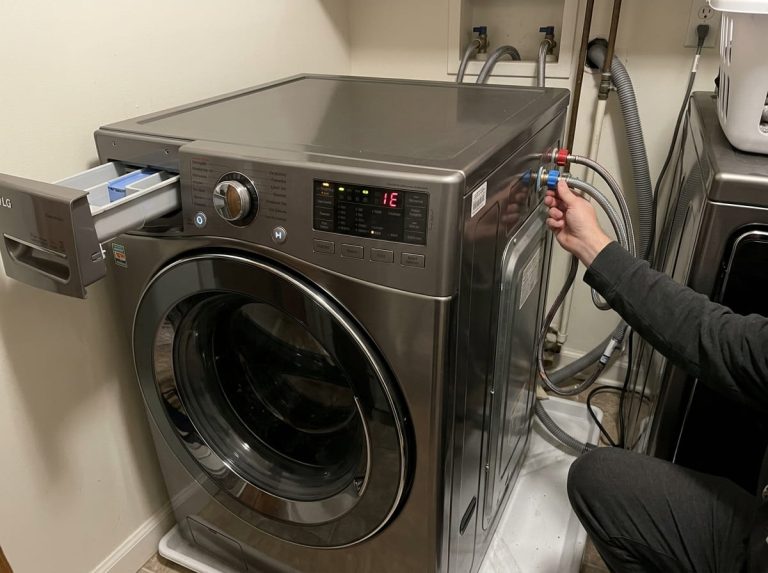
First, check the water supply. Both the hot and cold water faucets behind the washer must be fully open, since the machine draws from both. It is easy for a valve to get bumped partly closed during cleaning or a move.
Second, inspect the inlet hoses. Look behind the washer for kinked or pinched fill hoses that restrict the flow. Straighten any sharp bends.
Third, clean the inlet screens. Where the fill hoses connect to the washer, there are small mesh screens that catch sediment. In Tucson’s hard water, these clog with mineral scale and debris, choking the water flow and triggering the IE code. Turn off the water, disconnect the hoses, and clean these screens. This is one of the most common fixes for an IE error in a hard water city.
Fourth, consider water pressure. If your home’s water pressure is low, the washer may not fill in time.
If the supply is on, the hoses are clear, and the screens are clean but the IE code returns, the water inlet valve or the water level sensor may be faulty, which calls for a technician.
Troubleshooting the FE (Overfill) Error
The FE error is the opposite problem and usually points to a part rather than a simple setting. When the washer senses too much water, it flags FE and drains for safety. The leading cause is a water inlet valve that is stuck open, letting water keep flowing in even when the machine has told it to stop. A worn valve, or one held open by hard water scale, does this. The other common cause is a faulty water level sensor, also called a pressure switch, which misreads the water level and tells the control board there is too much water when there may not be. Less often, a control board fault is behind it. Start by unplugging the washer for a few minutes to clear any glitch, but if the FE code returns, the inlet valve or pressure sensor usually needs testing and replacement by a technician, since a valve stuck open is also a flood risk.
Try a Reset First
For both codes, a simple reset is worth trying before anything else, because electronics can throw a false code. Unplug the washer or switch off its breaker for about five minutes, then restore power and run a short cycle to see if the code returns. If it clears and does not come back, it was a temporary glitch. If it returns, work through the causes above for the specific code you are seeing. A reset costs nothing and sometimes saves a service call.
Why Hard Water Makes These Codes Common in Tucson
Tucson’s hard water is a major reason LG washers here throw IE and FE codes. The mineral content leaves scale on the inlet screens, inside the water inlet valve, and on the moving parts that control water flow. Scale clogging the inlet screens chokes the fill and triggers IE. Scale keeping the inlet valve from sealing lets water flow when it should not, triggering FE. This is why local LG washers develop these faults more often than machines in soft water areas. Cleaning the inlet screens periodically and considering a water softener both help reduce how often these codes appear.
What You Can Safely Check Yourself
The homeowner checklist is friendly, especially for the IE code. Confirm both water faucets are fully open. Straighten any kinked fill hoses. Turn off the water and clean the inlet screens where the hoses connect, which clears hard water scale. Try a five minute reset. For the FE code, unplug the washer to clear a possible glitch and shut off the water supply if the drum keeps filling, since a stuck valve can flood. Most IE errors are solved by the supply, hose, and screen checks. FE errors and persistent IE errors usually need a technician to test the valve and sensor.
The Risk of Ignoring an FE Error
An IE error is mostly an inconvenience, but an FE error should not be ignored, because it involves too much water. A water inlet valve stuck open can keep filling the machine and lead to a leak or flood that damages your floor and anything nearby. The washer’s FE response and automatic draining are protections, but they are a signal that something is wrong with the water control. If you see repeated FE codes, shut off the water supply to the washer and arrange a repair promptly rather than running load after load and risking water damage.
When to Call for LG Washer Repair in Tucson
If you have checked the water supply, hoses, and screens and reset the washer but the IE code returns, or if the FE code keeps coming back, the water inlet valve or the water level sensor is the likely cause, and both need professional testing. This is where A Plus Appliance Repair helps, because our technicians test the inlet valve, the pressure sensor, and the control board, identify the exact fault, and complete the repair with quality parts backed by a warranty. With over 12 years of experience and same-day or next-day service, we get your LG washer running again without the guesswork or the flood risk. Call or text 520-485-5885, and see our washing machine repair in Tucson and LG appliance repair in Tucson pages for more.
The Water Inlet Valve Connects Both Codes
It is worth understanding that the water inlet valve sits at the center of both the IE and FE codes, just in opposite ways. When the valve or its screens are clogged with hard water scale and cannot let enough water through, you get an IE code. When the valve is worn or scaled so it will not seal and lets water through when it should be closed, you get an FE code. This is why the valve is one of the most common LG washer parts we replace in Tucson, and why hard water is so often the root cause. Our guide on water inlet valve problems, causes, and fixes covers this part in detail, and our overview of how hard water causes appliance problems in Tucson explains the scale issue behind it.
The Bottom Line
An LG front-load washer showing an FE or IE error code is reporting a water problem, with IE meaning not enough water in and FE meaning too much. For IE, check the water supply, hoses, and the hard water clogged inlet screens, then reset. For FE, suspect a stuck inlet valve or a faulty water level sensor and shut off the water to avoid a flood. In Tucson, hard water scale is behind many of these faults, and persistent codes need professional LG washer repair Tucson service to test the valve and sensor.
Frequently Asked Questions
What does the IE error code mean on my LG washer?
The IE code is a water inlet error. It means the washer did not fill with enough water in the expected time. Common causes are a closed water faucet, a kinked fill hose, clogged inlet screens from hard water, low water pressure, or a faulty inlet valve.
What does the FE error code mean on my LG washer?
The FE code is an overfill error. It means the washer detected too much water in the drum and stopped, often draining to protect your home. The usual causes are a water inlet valve stuck open or a faulty water level sensor that misreads the water level.
How do I fix an IE code myself?
Confirm both water faucets are fully open, straighten any kinked fill hoses, and clean the small inlet screens where the hoses connect to the washer, since Tucson’s hard water clogs them with scale. Then reset the washer. These steps fix most IE errors.
Can I fix an FE code myself?
Try unplugging the washer for five minutes to clear a glitch, and shut off the water supply if the drum keeps filling. But a recurring FE code usually means a stuck inlet valve or a faulty pressure sensor, which need a technician to test and replace safely.
Why do these codes happen so often in Tucson?
Tucson’s hard water leaves mineral scale on the inlet screens and inside the water inlet valve. Scale clogging the screens triggers IE, and scale keeping the valve from sealing triggers FE. This makes both codes more common locally than in soft water areas.
How do I reset my LG front-load washer?
Unplug the washer or switch off its breaker for about five minutes, then restore power and run a short cycle. This clears a temporary glitch. If the code returns, work through the causes for that specific code or call for repair.
Is an FE error dangerous to ignore?
It can be. A water inlet valve stuck open can keep filling the machine and cause a leak or flood that damages your floor. If you see repeated FE codes, shut off the water supply to the washer and arrange a repair promptly rather than risking water damage.
When should I call a professional for my LG washer?
Call when the IE code returns after checking the supply, hoses, and screens, or when the FE code keeps coming back. Those point to a faulty inlet valve or water level sensor that needs professional LG washer repair Tucson service. Call 520-485-5885.